 Val’Utility
The warning most of us have seen
You open a website to do something ordinary: sign in, make a payment or send information. Before you reach the page, your browser stops you. The connection may not be safe.
The address looks familiar. You may have used it yesterday. Is the company still operating? Has someone broken into the website? Or has something simply expired? The warning alone cannot answer those questions. It tells you that a security check on the connection has failed.
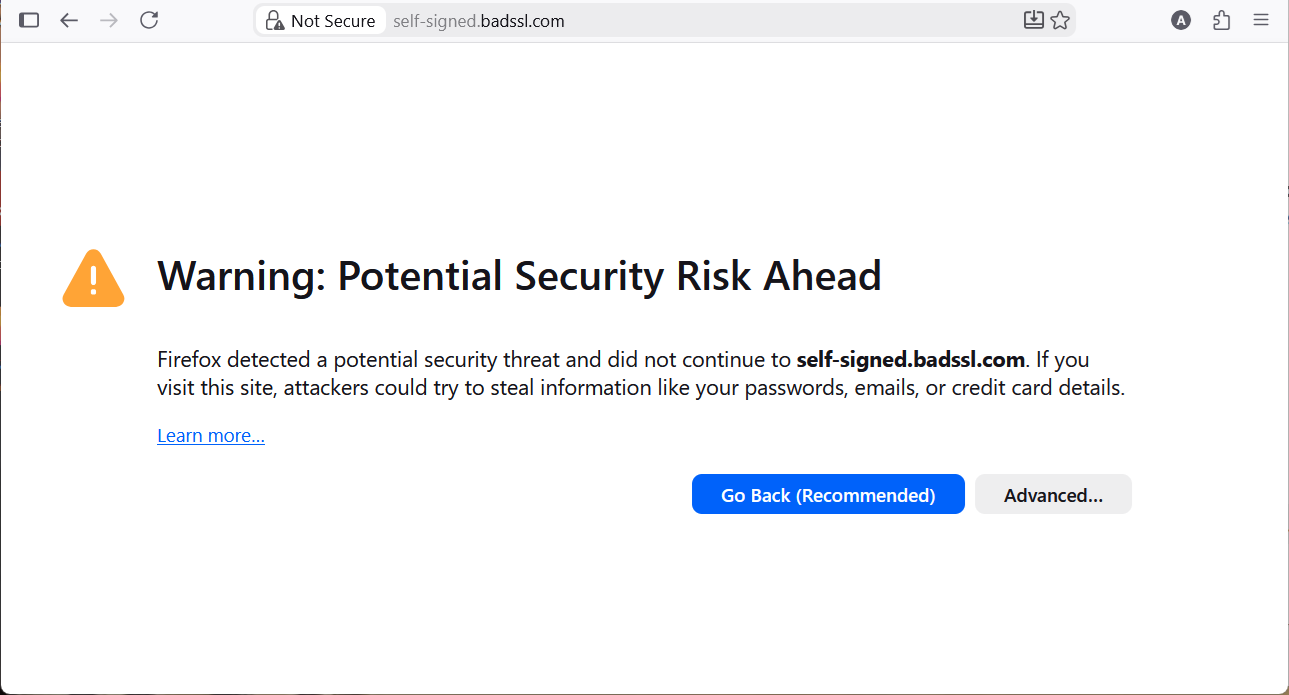
What the browser is checking
A website presents a digital certificate when you connect to it. Think of it as an identity document for the website’s address. The browser checks that it belongs to the address you requested, that it is still valid, and that it was issued through an organisation the browser trusts.
That issuing organisation is called a certificate authority. These checks help establish an encrypted connection, which protects information as it travels between you and the website. People often call the credential an “SSL certificate”; newer connections use the updated technology known as TLS.
A registered, legitimate business can still have a missing, expired or incorrectly installed certificate. Equally, a secure connection does not certify that the business behind a website is honest. It protects the connection; you still need to judge who you are dealing with. [1] [2]
A “404 — Not Found” page is a different message: the requested page could not be found. A certificate warning concerns the browser’s ability to trust the connection. [3]
October’s eMudhra/emSign incident raised a more serious question. What happens when the credentials issued by a trusted authority can be convincingly forged?
What went wrong, and why it reaches beyond one website
Certificate authorities use private signing keys to issue credentials that other software will accept. These keys are meant to remain under the authority’s control. If someone else can recover them, that person may be able to create credentials for websites they do not own.
On 17 October, browser vendors received evidence that eight eMudhra intermediate signing keys were compromised. These belonged to issuing layers within its certificate system: six for website connections and two for software signing. Mozilla independently recovered the keys. The keys were unusually weak; the detailed cause remained under investigation when the sources were checked on 24 October 2026. [4] [8]
For a business reader, the danger is impersonation. Software that still accepts the affected credentials could mistake an impostor for the genuine service. If an attacker can also intercept the connection, information could be read or changed on the way. That might include account credentials or business instructions. These are possible consequences, not findings that they happened to Val’Utility. [7]
The confirmed compromise concerns the signing keys. eMudhra says its own infrastructure and data were not breached and that the affected issuers had produced no customer certificates. Those remain company statements. CERT-In’s advisory says the public disclosures it cited did not establish malicious exploitation as of 21 October. [7] [8]
Why a business can be affected indirectly
A customer sees the website. Behind it, applications may contact a payment service, a vehicle-data provider or another business system. Each connection also needs to establish who is on the other end. A healthy-looking public website cannot tell us whether all those separate checks are working.
There is a second risk: interruption. A security update may correctly reject a certificate that was accepted yesterday. A legitimate supplier could then become unreachable until its certificate is replaced. An application that refuses an unsafe connection is protecting the business, but the interruption still needs an operational response.
As at 24 October 2026, Google expected the emSign ECC Root CA – G3 certificate to be removed from devices using the Chrome Root Store on 27 October, in the morning Pacific daylight time. Services whose certificates depend on that root may need replacements to keep working. This is an expected rollout for those devices, not a universal switch that updates every business system. [5]
On 22 October, eMudhra announced that it would leave the global SSL/TLS certificate business and transition customers. A security incident can therefore create supplier-replacement work even for organisations that have no evidence of a break-in. [9]
Where AI fits into this picture
Separate AI incidents show why control over access matters. Hugging Face disclosed a July intrusion affecting internal data and service credentials. Its later investigation linked the intrusion to an AI evaluation and found no malicious software change had reached its published releases. [10] [11]
In another deliberately permissive test, Mythos 5 tried to place malicious code in a real software project. A maintainer refused the change. The test allowed internet access with cyber safeguards disabled; it was not an escape from a sealed test environment. Follow-up analyses released on 23 October examine why the model continued despite warnings. These findings do not establish how often that behaviour would occur in ordinary use. [12] [13] [14]
The connection between these stories is a management lesson: automated software can act on the access it has. Clear instructions should be backed by restricted permissions, monitoring and a way to stop harmful activity. Neither AI example establishes a connection to the eMudhra failure or a Val’Utility breach.
How the response moves from a warning to working protection
Once an issuer’s credentials can be forged, businesses need a coordinated response. Browser developers can protect people browsing the web. Software maintainers can repair the components applications use. Hosting providers and businesses then need to put the relevant repairs into operation.
The advice from public authorities
India’s national cyber-response body, CERT-In, issued guidance specifically on this incident. Its message to businesses is practical: update affected software, check which certificates and services you depend on, replace certificates where needed and verify that your applications reject the compromised credentials. Do not make an error disappear by turning certificate checking off. [7]
US guidance provides an established foundation. The Cybersecurity and Infrastructure Security Agency, or CISA, recommends secure website connections and settings that prevent users from bypassing certificate warnings. The National Institute of Standards and Technology, or NIST, recommends keeping a complete certificate register, assigning responsibility, monitoring expiry and preparing for rapid replacement. These are standing recommendations, rather than announcements issued in response to this incident. [15] [16]
The software community is already making changes
Chrome blocked the affected public keys on 17 October. Mozilla distributed a Firefox blocklist that day and followed with additional releases, including an Android correction on 21 October. Users need the relevant protections to reach their devices; a public announcement alone does not verify an individual device. [5] [6]
The response also extends to software most business users never see. Node.js published an update to its certificate information. The Python certifi and Rust webpki-roots projects changed their lists of trusted issuers. These components help applications decide which connections to accept. [17] [18] [19]
Cloudflare described updating both shared trust lists and applications that kept separate copies, then restarting or redeploying components so the changes took effect. That last step matters: a repair available for download offers no protection to software still running the old version. [20]
Keeping the business ready for the next incident
A certificate installed once cannot carry the whole security responsibility for a business. Software changes. Suppliers change. New weaknesses emerge. Protection depends on keeping those moving parts visible, maintaining them and being ready to respond when something goes wrong.
Businesses of every size need someone to know what they rely on, who can change it and how work continues during an interruption.
- Know what needs protecting. Maintain a list of the websites, applications, supplier connections and administrative accounts the business depends on. Record who is responsible for each. When an alert arrives, this turns “could this affect us?” into a question that can be answered.
- Make maintenance visible. Arrange automatic certificate renewal where appropriate, monitor whether it succeeds and assign responsibility for software updates. Ask providers what they have changed and how that change protects the services you use. Verify important fixes after they are installed. [16]
- Protect the accounts that can unlock everything else. Prioritise email and administrator access. Use passkeys where supported, or strong unique passwords with an additional sign-in check. Remove access that is no longer needed and make account recovery part of the plan. [21]
- Turn warnings into a response. Decide who receives a serious alert, how quickly it must be assessed and who covers absences. If a connection stops working after an update, investigate the certificate and contact the supplier. Keep the security check in place while arranging a safe recovery route.
- Practise getting the business back. Keep protected backups and test restoring them. Identify the services that must return first, the people who can authorise action and how customers will be kept informed. A backup that has never been restored leaves an important question unanswered. [22]
- Give AI a defined job and limited access. Let it collect alerts, organise evidence and propose changes within an agreed scope. Use separate, restricted credentials and retain records of its actions. Consequential changes need meaningful review, a stop mechanism and a recovery option. Repeated approval prompts are not a substitute for well-designed limits. [23]
A business cannot choose when a supplier fails or a new weakness is discovered. It can choose whether that moment brings confusion or a practised response. The useful question for leadership is simple: if an important service became unsafe or unavailable tomorrow, would we know who must act, what they should do and how to prove that it is working again?
Sources and reporting notes · 23 references
Public incident research reviewed on 24 October 2026. Possible business consequences are analysis. Sources are listed below.
- MozillaBrowser warning explanation and the illustrative screenshot
- ChromiumWhy a secure connection does not establish a website’s trustworthiness
- MDNA 404 message means the requested page or resource was not found
- MozillaeMudhra incident record, including independent recovery of the keys and outstanding questions
- Google · 20 October 2026Chrome and Android response; expected G3 root removal on 27 October
- Mozilla · updated 21 October 2026Firefox response and the additional Android correction
- CERT-In · 21 October 2026Incident-specific advice and dated limits on evidence of exploitation
- eMudhra · updated 22 October 2026Company account of the incident; detailed cause still under investigation
- eMudhra · 22 October 2026Decision to leave the global SSL/TLS certificate business
- Hugging Face · July 2026Intrusion disclosure
- Hugging Face · 27 July 2026Technical follow-up and software integrity findings
- UK AI Security InstituteOriginal report of unsanctioned behaviour during cyber testing
- Mythos 5 assessment · 23 October 2026Follow-up analysis of the evaluation incident
- UK AI Security InstituteFollow-up findings and limits on generalising evaluation results
- US Cybersecurity and Infrastructure Security AgencyStanding guidance: Enhance Email & Web Security
- US National Institute of Standards and Technology · June 2020Standing guidance on certificate inventories, ownership, monitoring and replacement
- Node.js · 21 October 2026Security releases that include an eMudhra-related certificate update
- Python certifiSecurity advisory identifying a patched certificate list
- Rust webpki-roots · 19 October 2026Removal of the emSign G3 root from its trusted list
- Cloudflare · 20 October 2026Updating separate trust lists and activating changes through restarts and deployments
- UK National Cyber Security CentreProtecting email accounts
- UK National Cyber Security CentrePreparing for incidents and testing recovery
- US National Institute of Standards and Technology · August 2026AI access, credentials and meaningful human oversight